Showing posts with label Computer. Show all posts

Tuesday, March 9, 2010

Finally, you are gone…

Remember the first time I saw you, you seem special, and you were my only one. I spent quite some time with you, until she appeared.

She had a foxy tail, and, definitely, better than you, in everything. So, slowly, I gave up on you…

Ok, enough crap. It’s just about Internet Explorer 6 and Firefox.

Since Google remove the support for old browser like IE6, it forced organization to upgrade their browser to the supported version. This is Google’s initiative to push the Internet forward, and I totally support it~

Internet Explorer 6 died on 1st March, 2010.

Aten Design Group organized a funeral for IE6, which quite hilarious, but it’s a respect for a browser which been on the Internet for 8 years… RIP.

Visit the official website at www.ie6funeral.com

Photos of the funeral, from flickr.

4407626835_cfd42fe586_b
Handwritten message from Team Microsoft. SAD.

 4408393660_00ef988862_b
R.I.P.

 4408393974_422d7beb40_b
IE6 last look.

 4408398938_7a5fa92279_b
Don’t cry my friend, IE6 will be remembered.

 4408399624_148d68c0b0_b
Before closing the coffin.

 4408400572_13c1fd8e70_b
We will miss you.


Wonder will they make a funeral for Windows 98 or 2000?

Tuesday, October 27, 2009

Dell Studio 14, at my service~

My poor Acer laptop that is already 5 years old, is having all sorts of problems, that I think it’s time to get a new one. Just before sem break started, the adapter died. RIP. I am not person who like to change things, but things like computer just have to change every some time, haiz, technology.

New Companion~
Had been aiming this new partner for quite some time. At first glance, she already attracted me, and I swear I will get her, she is Dell Studio 14~

After my HungryLappie (my Acer laptop) died, I ordered it from Dell website, customized some features, and upgrade warranty, ouch, RM3707!

Last Tuesday, I received it, woho~~

DSC01726
Erm, after look at it for some time, the feeling is not like the one in Dell website, nevermind, still love it~

It’s preinstall with Windows Vista Home Premium, but I reformatted into Windows 7 Ultimate straight away.

DSC01734
Now is Windows 7~ Forget Vista, Win 7 real cool. Thanks Aaron for the Windows 7 Ultimate CD-Key.

Design
This is the default cover design, ChainLink. Other colour charge RM71, stupid. From the website, I see only a black glossy cover, and when received it, only I saw the dim chainlink pattern. It’s not only on the outside cover, but also on palm rest.

DSC01737

DSC01728

Read some forum, some people really hate this design. Anyway, I feel it’s fine with me. If you don’t look at it very close, you won’t notice it.

DSC01746
It’s a 14 inches light laptop, because I don’t plan to just put it on table at home.

DSC01747
Special connector design, with power button on it.

DSC01763
This is the “function key problem”  I mentioned earlier. When you want to close an application, instead press Alt + F4, in default Dell Studio and other new Dell laptop line, I need to press Alt + Fn + F4. But this behaviour can be changed in BIOS setting.

DSC01773
Standard Home, End, Page Up, Page Down layout. It really saved a lot of my time but a lot people don’t use these keys.


Major Specification
Model: Dell Studio 1450
Battery: standard 6 cells only
Display: 720p 1366x768 resolution
Processor: Intel Core 2 Duo P7450 2.13GHz 1066FSB 3MB Cache
Memory: 4GB DDR3 1066MHz SDRAM
Hard disk: 320GB 5400RPM, enough for me already, ha.
Graphics: 512MB ATI Mobility Radeon HD 4530
Weight: 2.36kg

Warranty
The most expensive upgrade is warranty, contributed RM500 of the price. I upgraded to 3 Years Complete Cover warranty, means ANY accidental damage, except fire and stolen, can be repair, mostly on site(means they come to you, not you go for them).

Some people don’t find warranty to be useful, but previous experience taught me, laptop broke down rate is sooooo high.

I don’t want when anything happen to my PC, I still need to drive a car send it to service centre, wait for 1 month to service, and maybe need to pay extra charge. Dell is really professional at after sales service, respect~

Payment
Customer like me who without credit card or cheque, I used direct bank in to Dell Citibank, and send the bank transaction ID to Dell via email, so they can process my order.

DSC01749

After Thought:
Overall very satisfy with it, Thanks Sandy Lee, Dell sales person, who assisted me throughout the whole purchasing process and answer all my weird questions. I guess I already sent her more than 20 emails, but she answer all nicely.

The first 1 week of waiting is so hard, everyday I checked the order status, when saw the process flow is moving, feel damn happy~

Moreover, this Studio is bought with my hard earn internship money + PTPTN money, earning money is so hard…

**Not to show off la, just wish anyone who interested to buy Dell Studio 14 got some reference~

Monday, October 12, 2009

Keyboard

This keyboard had been used for 1 year and half.

Like it a lot.

But every time back from semester break, it was covered with dust, even though it is in house.
Cyberjaya is really a dirty place.

Some "experts" said, keyboard is a spread medium for bacteria, virus etc. I not sure.

This is my keyboard inside view. (click for a larger view)


Scary leh.... Inside contain anything you can mention. Hair, dust, sand, biscuits, threads, dead spider and ants etc.


I picked out all the keys, and having fun time fixing it back in correct position.


Done, clean~

Thank for being my slave these years, muacks~haha.

Friday, January 9, 2009

Windows 7

I think this is just a codename for it, the real name... I doubt Microsoft will name it 7.

I am not very excited with this new OS, as I am just using my Vista for only 2 years. After the sales of Vista has not meet the required target, they blame the corporate who don't switch to it, and never think that how much cost required to do a overall system upgrade.

For home user, yea, I support Vista; if I got a company with year 2000 PCs, and want me switch to Vista, go to hell. And I still need to bother with all the compatibility problem some more..

Same case with Windows 7. If Microsoft can't solve the system resources problem, they will end up like Vista, thrust me.

The major improvement that can be "seen" is the support of Multi-touch monitor and voice recognition system upgrade. Can imagine the scene like one of the science fiction movie?

image

The Beta will be released soon.

Sunday, January 4, 2009

I like this symbol~

~

The symbol is call Tilde, or Swung Dash.

Don't know since when, I started to use this symbol in my daily IM chatting. "Hello~", "Bye~" etc.

Until yesterday when I replied "~~" to a friend, she asked me: "what is ~~ means actually?"

Em... then I realized, every time I use that symbol, I am smiling.

It means smile.

Thursday, July 3, 2008

I broke World Guinness Record!

Remember on 17th June 2008, me, together with other 8 millions 2 thousands 5 hundreds and 29 people all around the world, had set a world record of "Most Downloaded Software in 24 Hours" by downloaded this long waiting Firefox 3!

Yes, it's Firefox 3, yo!

Not believe me? This is my certificate. If you also downloaded Firefox 3 on the day, here to get your certificate. (Sounds very SS, but only if you are having the passion towards Firefox, you will feel the joy~)

Firefox 3 Certificate

The total downloads are much more 'crazy' than what I thought, which is only 5 million, but the actual amount is 8,002,530 downloads!

Congratulation Firefox and open source community for this piece of work. IE, work hard la!

Wednesday, June 25, 2008

A Noob's Historical Moment.

Today, I sitting in front you,

the time is 11:13 am,

25th June, 2008,

A historical moment has happened;

This may not be a success,

but a brave start is half of it.


We may not be the one,

that people will remember forever;

But it's a moment,

where mark the starting point;

And say Hello to the World.


OK, enough crap, I just want to say I just done my VERY first Java compilation, "Hello World!"~ Cold! Very noob!

(For readers who don't know, here Java is a programming language, not the island at Indonesia)

061204_big_daddy_java
sh...it, baby talk Java now. (comic from http://blaugh.com )

Monday, April 14, 2008

Little Dinosaur in my Printer

While I studying for exam, suddenly, I saw a small lizard on my table.

I don't move, see what the lizard going to do. It crawled, crawled, crawled, crawled over the wires, and....

hoi! Don't even think about it! Hey!

And the lizard crawled into my printer!

DSC02177

DSC02179

DSC02176

See? The lizard is doing Cicak-Man show in my printer.

I turn around the printer, hitting the bottom to make it out, but it's so tough, still sticking up side down. At last, it crawled into some part where I can't see it.

Here I give you a chance, you better crawl out, and I won't hurt you. Don't die in my printer, please~~

Sunday, January 27, 2008

Google coming in Malaysia?

I read this on LowYat.Net, our Boleh PM, Abdullah Badawi saying that Google( yes, is Google) is interesting to set up a base in Malaysia, due to Malaysia's policy.

I wonder what policy is that, if is about Malaysia's support towards ICT, go die. Malaysia, and the whole world knows that ICT is very important, and Malaysia is taking steps to set up MSC(recently changed to MSC Malaysia), so what?

Government hospital's staff don't know how to on PC; PTPTN website and database system is the worst system I ever seen, I believe the worst graduate can write a better one; everything is so manual in Malaysia, even our IC is chip base, but we all just use it as a 'card', government bank never offer online banking, and many more examples.

Although I do hope that this is not just hot air, as Google is one of my dream workplace, but to set a base in Malaysia which don't have enough IT graduates and professions, while Singapore already has a Google base.

Anyway, if Google is coming, of course we all welcome!

Technorati Tags: ,,

Monday, January 14, 2008

A long long days I didn't post.

Huh.... since my semester break started 3 Jan, I didn't online: no Live Messenger, no Firefox, no games, nor anything related with my daily computing...... except my lovely SE K600i~

Why?
My laptop show me sudden dead 3 months ago, and the main thing that let me depress is the hard disk which spoiled, not other replaceable part. Hard disk of course is replaceable, but the data in there is so precious to me! I checked for the recovery fees: USD 1000 to 5000~ forget it for now, I will recover it when I am rich enough!

I bought a new desktop PC just few days after the dead of my laptop, and she--Hungry PC, is sleeping quietly at my Cyberjaya house. She is the one who gave me all I want in the 3 months and the future, love her so much.

A new Hard Disk.
At PC Depot at Penang, I bought a new notebook hard disk with external casing at RM189. Fix on my dead laptop, formatted it, and install with Windows XP, feel so guilty to use pirated, but I tried many many ways to install Linux(it's free and legal), but my laptop with a faulty Combo drive can only read DVD, not CD, so Ubuntu Live CD and my Windows XP OEM CDs can't install on this laptop...

And after installation, my dead laptop revived!

Applications that I installed
To let me feel not so guilty, all the programs I installed on this laptop is open source and freeware. Free Download Manager, Firefox, OpenOffice, ALZip(similar and more features than WinZip and WinRAR), COMODO Firewall, bla bla bla.

Maybe some of you started to feel that I thought too much, no need to feel guilty, you are no wrong.... And I admit I am weird, after study IT, I realized an application is not easy to write, and steal it is just too bad to the programmer. But sometimes I just can't afford original very pricey software like Flash, Photoshop, however I still need to install it later... As I have a lot of campus projects need to go on.

Today's quote:
If you think you are right, do it;
else, don't...... or do it with guilty.

Saturday, November 3, 2007

My 'Wow' started late, but just right in time, I think.

Notice I never online for 1 week? Sad, during my holiday in Penang, my lousy-ultimately-seriously-slow-terrible-3.9-year-old PC was spoiled, due to my improper shut down, and the OS corrupted. Yes, you said: format la! And I will say: combo drive was spoiled almost 1 year ago.

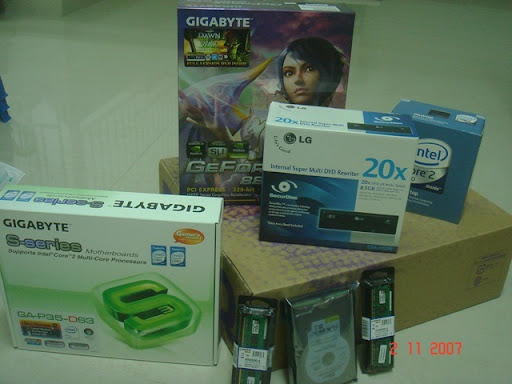
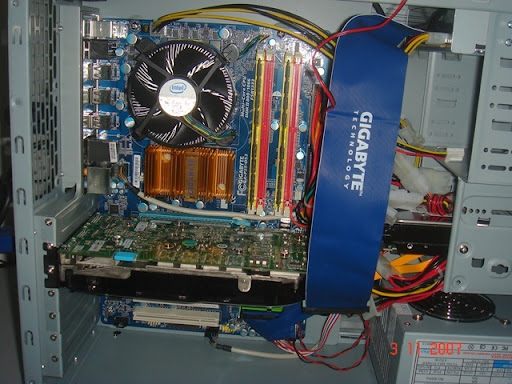
Because of this reason, I came back Cyberjaya earlier, and get my new PC. (The old one will be repair! Just I need a more powerful PC). I went to Lowyat Plaza yesterday, alone of course. And get these rig from ViewNet, my favorite PC retail shop:

  1. BENQ FP92W 19" wide screen LCD monitor
  2. 1GB x 2 Kingston DDR2 800MHz
  3. Gigabyte P35 DS3 Motherboard
  4. Intel E6550 processor
  5. 250GB Western Digital Hard disk
  6. LG 20X DVD burner
  7. and, Gigabyte GeForce 8800GTS 320MB

029

Just the monitor already weighted more than 6kg, and only me, with 2 hands, carry it back from Lowyat Plaza KL, to Cyberjaya. (of course I ride bus and train la)

Actually want to build it today morning, but I started 4am last night, 'thanks' to Nescafe and mosquitoes. 

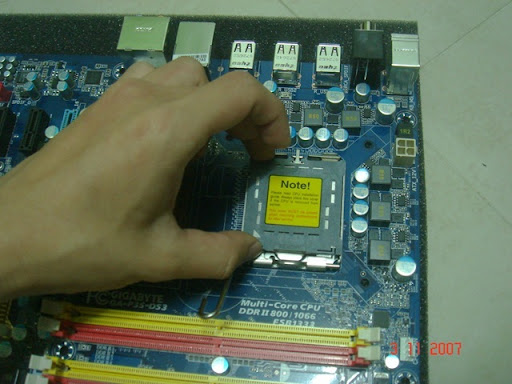
Here it goes
039
my hand shake like chicken leg, not because too excited, you will know if you carry 10kg stuff from KL to Cyberjaya.

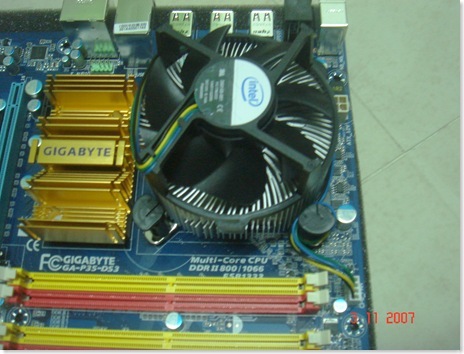
042
Then is the stock heatsink. So noisy, consider to change it later.

045
2 slots of RAM.

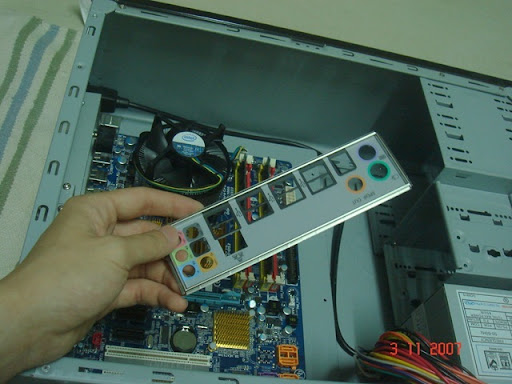
048
Just realize I forgot to fix the back panel, so have to unscrew the motherboard from  casing......

055
The queen of my rig, 8800GTS~~

Completed 1
Completed!

Outview 2  So handsome, for now. Can't tell 2 years later.

DSC00170
Full System look, but without speakers yet. Actually want to get Samsung 931BW monitor, then the whole system will look black.

Inject the soul
I used to say: why study IT? Because if there is only hardware, there is no meaning for a PC to exist, so IT professional will design the soul, inject it, and give life to PC... I injected(installed my long long Vista

Technorati Tags: , , ,

that I bought 6 months ago)

Review? Perhaps.
I am not some reviewer, just write out what I feel about these.

BenQ FP92W
According to the shop seller, BenQ color is "nicer". What I thought is, human eyes can't differentiate a very minor difference in color, unless 2 monitors putting side by side. Another weakness is, when you view from 45 degrees from the top, the screen is in pink color. That time, Samsung 931BW out of stock, so I just get this BenQ, save RM 130.

8800GTS 320MB
Until now, I still didn't really find out the difference yet, only in heavy graphic rendering task like games, then I will notice. With current max 450 Watt output, I worry it may not enough to get peak graphic performance. One more, the nVidia control panel sucks! Just simple adjustment, no fun.

Intel processor - stock fan so noisy!

Kingston RAM - 800MHz 2GB, compare to my previous PC with 133MHz 512MB, really a big difference in reading and writing speed.

Hard disk - fast enough la~~ 250GB yet, won't full in these years. (Hey, no porn in my hard disk!)

LG 20x Secure Burner - What is that secure feature? I also don't know, hope it won't get into my way during reading and writing data.

After Word:
I spent about 5 hours to set up this machine. This is a long time, as I doing it slowly, taking photos, finding right tools, and reading manual book. The tools I used to unscrew and screw include scissor and a screwdriver with big body which can't screw narrow parts.

This is consider my first desktop computer. I used to do all my computing on my 3.9 years old laptop, which I got it in early 2004 as my PMR full As reward. Now it has to be retired, thanks for giving me fun, help me do homework, talk and act story to me.

Don't call me rich bastard as I bought 8800GTS. I don't want to waste my money on directX 9 card, and compare 8600GTS, the price is just 200~300 different, but performance is 3 times better than 8600GTS. So invest on 8800GTS would be much better in long term.

Will do a benchmarking for my PC later, current Vista Rating, I got the following score:

  1. Processor 5.3
  2. Memory 5.9
  3. Graphics 5.9
  4. Gaming graphic 5.9
  5. primary hard disk 5.3

OK OK la, I just hope there won't be any defect, then this PC should stand for 5 years before coming to outdate fate.

Sunday, September 16, 2007

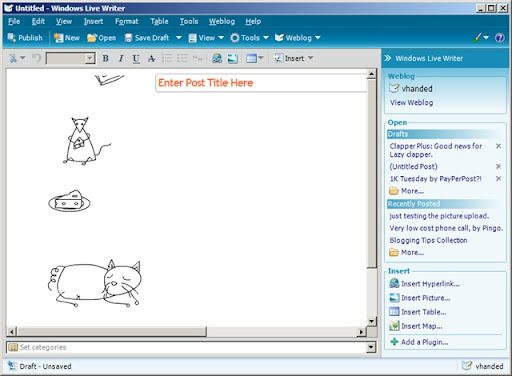
New Windows Live Writer -- New Experience in Blogging

I always wonder how other bloggers write their blogs, are they write in Office Word, and do some spelling checking, then login to their Blogging service and paste there, if related with photo or embed movies, then need to do extra works.

I am Using Windows Live Writer.
I have been using Windows Live Writer since the first post of my blog, and this handy-all-in-1 blogging tools satisfy most of my need.

However, since this is Microsoft product, and it is under beta, so the previous version targeted mostly Windows Live Spaces users, and with limited functions to other blogger service users.

Latest Version is Ready to All Bloggers!!
The latest version, (2008, build 12, en) was released! I just downloaded it yesterday, and try it out.

image

Here is the upgrade of it:

  1. The obvious, Vista Interface. (I am still XP user)
  2. Photo Upload directly to Google Server(or any respective blogging server)
  3. Add embed video in just 1 click(no more searching through HTML code)
  4. Instant Spelling Checking.
  5. Support 'Categories' for Blogger.
  6. Add table with just 1 click. (last time I always using HTML code to add table, very messy, very slow)
  7. Nicer image handling, anti-alias image.
  8. Reminder to set categories, tag, and title before upload.

image

Other functions compared to stupid online submission are:

  1. Can set Underline, Italic, and Bold using Office Style, which means by pressing Ctrl+U, Ctrl+I, Ctrl+B.
  2. Insert the picture from web, from your local PC, from anywhere.
  3. Downloadable plug-ins, like Insert Technorati Tags, Insert Flickr Image, and a lot more, can be found here.
  4. Draft, so if you don't want to upload yet, save it first.
  5. Retrieve back previous uploaded post from the sidebar, edit it, and upload it again.

These are the significant feature of this beta application, hope can share with you all guys, make blogging more fun!! You can download it at Windows Live Writer Blog.

Technorati Tags: - -

Monday, April 16, 2007

The first time to a real PC Fair

I just said this is a first time, why? Actually this is the second time I been for PC Fair, the first time is at Melaka Mahkota Parade, the so called PC Fair... so small, not enough for me to sleep. So I consider the KLCC PC Fair that I went this afternoon as the first time I visited a real PC Fair.

Thanks to KIM HUEI, we have place to sleep and eat, and transport. After a really mighty super duper sardine fish pack in all KTM Komuter, Putra Lines, Monorail, we arrived KLCC. That time was about 12pm. We straight went to the 3rd floor of convention center, and start searching for nice goods(although I am not plan to buy anything). Out of my expectation, KLCC PC Fair is much much grand and big and crowded!
DSC08814
The first booth near the entrance, Sony VAIO.
DSC08820
All branded companies show off their gadgets, of course, by beautiful girl promoters. Looking at those laptops around me, I have no interested to buy it, as I targeted a desktop, so I took up the opportunity to take some photos with beautiful cute girls. hehe. This is my favorite one:
DSC08826
Samsung! She is so cute!

Hope next time can get my own SLR and snap around there.

The price
Everybody thought that PC Fair sell cheap stuff, not really. I don't know whether I need to bargain with them, but the price that they stick out is standard, not cheap, and some I can get cheaper at LowYat Plaza, like RAM. Some very unexceptable prices, like Sony Memory Stick Pro Duo in PC Fair cost RM140, but in LowYat Plaza I can get with RM120, at Thunder Match. Even my dream monitor Samsung 940BW in PC Fair, the lowest price I can get is RM720, same as Low Yat Plaza. I too thought Intel Core 2 Duo E6400 will be cheaper in PC Fair.... but not. This change my thought that PC Fair is not a fair, but just a central to sell IT stuff, but if without PC Fair, I don't think IT gadgets' prices can drop that fast in couple days.

Around 2:30pm, we left KLCC, and headed to Low Yat Plaza, as Kim Huei want to buy some stuff from ViewNet, which he claimed is the cheapest shop in LowYat(is it? Some stuff la, not all.) While he buying his things, I checked around in the Plaza, and that's why I found out so much different with PC Fair and normal day sale. Really hope the price won't increase after PC Fair, as I need to readjust my budget again... Money money money!

DSC08832
Samsung booth, so grand, so big.

Conclusion
PC Fair is fun, if you really smart, I believe you can get low price, plus some freebies. For people like me who don't like to negotiate about price, I think Low Yat is more suitable for me. If without PC Fair, I don't think the IT gadgets in Malaysia can drop that fast. Good job, PIKOM, who centralized all.... beautiful girls. Ok, be serious, haha, Windows Vista users will also increase after the Fair, as many people buying new PC during the event.

Technorati Tags: - - - - -

Friday, April 13, 2007

Now is the Motherboard: ASUS P5B-E PLUS

Ok, I believe most people who read my blog knows that I am going to buy a new PC at next semester(end of June), and I had started to survey on price and hardware performance one by one, to ensure my hardware won't outdated in 3 years(like my laptop).

My future motherboard
Before I start choosing, I had to set a few criteria:

Overclockable
Quiet
Environmental friendly
Looks cool
Not too expensive
Support Core 2 Duo and SATA 3Gb/s
DDR2 800/667(so I can upgrade later)

Of course, when mention about overclocking, people will point to ASUS, and I think because of this function, the motherboards are much more expensive than other ordinary motherboard. OK, make it simple, I abandoned other brands, and just stick to ASUS. 3 motherboards were placed in my choosing box: P5B, P5B-E PLUS, and P5N-E SLI.

Funny, P5B-E PLUS sounds more advance than P5B, but the PLUS version is cheaper. 1 feature that make me included P5N-E SLI in my choices is as the name, SLI (Scalable Link Interface), which means can connect 2 graphic cards together to process a task faster. However, I am not a gamer, I don't need SLI, but that's not the reason I gave it up, is because the chipset that it use is NF650i SLI, I seldom hear that chipset, and worry about the compatibility with certain software.

The reason I choose P5B-E PLUS, is because of the overclocking feature, the prices, and the material. It uses 100% All High-quality Conductive Polymer Capacitors to make the board, and it is cool(see the picture). Currently the price is RM590 at LowYat.

Other features of this motherboard is here:
Intel LGA775(Core 2 Duo socket)
Quad Core Ready(maybe 3 years later)
Dual Channel DDR2 800/667/533
Fanless design(or Stack Cool 2)
6 SATA II socket
High definition audio
IEEEx1, USBx10

and other common features. Click here for the full specification.

mobo

The capacitors look nice, right?

Technorati Tags: - - - -

Tuesday, April 10, 2007

New Graphic Card from Nvidia will release this month.

As you all can see from the title, new graphic cards will be release by Nvidia this month, or to make it specify, is 17 April.

This release, the main character is Nvidia GeForce 8 series, consist of 8600GTS, 8600GT, and 8500GT. This is a really big news for me, as I want to experience DirectX 10 and shader model 4.0 on my new PC.

I think most of you know that, only Windows Vista will supported with DirectX 10. And because of that, I struggle a long time to choose my future graphic card. ATI is definitely not in my buying list, (in narrow minded, I dont like AMD; and AMD bought ATI, so I don't like ATI).

Geforce 8600GTS
Yes, from all the 3 releases, I prefer this one. Here is the specification:

Code name: G84
Bus interface: PCI-E x 16(of course!)
Memory: 256MB
Core clock reference: 675MHz
Memory Clock reference: 2000MHz
Bandwidth reference: 32GB/s
Bus type: DDR3
Bus width: 128bit
Support DirectX 10 and OpenGL 2.1

The spec is very satisfying me, although some values are slightly lower than GeForce 7950GT, but compare the price and the performance, 8600GTS has more value per performance than the old 7950GT that can't support DirectX 10. Click here to see the specification performance of Nvidia GPU.

Pricing
Before the release of 8600GTS, I thought I never have the chance to experience DirectX 10, because even the low end 8800GTS cost around RM1300++... But now, the GeForce 8600GTS just cost around RM690 to RM794, half the price of 8800GTS, but get about 70% of it, that's definitely worth!

12011
The design is not as long as GeForce 8800, not really cool design, but can you see the SLI connector on top of the graphic card? Yes! It can support SLI! Actually, I am not a gamer, I just like to test several experiments with my new PC, feel excited to see high benchmark. Quite expensive way, right?

Some Radeon news:
Radeon will also release it's first DirectX 10 graphic card, the Radeon X2900 family, X2600, and X2300,(code name R600) with a lot of variety in the X2900 family, include X2900 XTX2, X2900XTX, X2900 GTO, X2900 XT, X2900 SL. Especially the X2900XTX2, it should be the best graphic card ever when it release. Click here to see the specification comparison.

Now one more PC component targeted, next is the motherboard.

See my previous post for my targeted hard disk and monitor.

Technorati Tags: - - - - - -

Saturday, April 7, 2007

SATA and SATA II ?

Again, I write post about my dream PC again.

This time, after my investigate about the monitor SAMSUNG 940BW, now I look at the other part of my new PC--hard disk.

What is SATA II?
To fully understand SATA II, I search on Wikipedia. But what make me confused is, no clear explanation of what is SATA II! Most PC catalogue show that their motherboards and hard disks are SATA II, but no further explanation on it...

After some searching work, I understood it.

Actually, SATA II is not a technology or brand name, just a marketers gave the new SATA hard disk that name. SATA, or Serial Advance Technology Attachment, is a new technology that using Serial cable to transfer data, instead of traditional parallel cable. During the time when SATA came out, the transfer rate is just 1.5Gbit/s. Later, a new organization, called SATA II was formed and they increase the transfer rate to 3.0Gbit/s. And because of that, marketer use the name of the board as the new 3.0Gbit/s SATA hard disk. Now the name of the board was change to SATA IO (Serial ATA International Organization).

What the big different about SATA and the so-called SATA II?
The only obviously different is the transfer rate(not to mention some architecture design of it). From the first generation SATA, (or so-called SATA I), the transfer rate is 1.5Gbit/s, doubled to 3.0Gbit/s in the next generation SATA (or so-called SATA II).

How about the buffer rate and the electric usage?
I don't think this is under SATA II works. This vary from manufacturers, as well as models. If you want to buy hard disk, you have to compare it by yourself. Of course, I prefer Western Digital (don't know why, feel they are professional). My next targeted component locked--WD Caviar® SE16 ! Come with 250GB,300MB/s, 16MB Cache, and 7200RPM, wow!

WDCaviarSE
WD Caviar® SE16, my future storage companion.

OK, finished my preferable hard disk, I want to show you all a cool hard disk by Western Digital, too.

150GB, 10,000RPM, 16MB Cache, and the best part is, the WD Raptor X is the world only Clear Cover hard disk! You can see how the platter spinning inside the hard disk, and how read/write head moving to read/write data, that's really cool!

Take a look at this video:


Technorati Tags: - - - - - - -

Technorati Tags:

Thursday, March 29, 2007

Make sure it's HDCP certified before you buy LCD Monitor

These months, I suffer a lot from my current PC: 4 minutes boot up, 5 minutes to start Photoshop CS2, 5 minutes for Macromedia Flash, and 2 minutes to shut down. This is the slowest PC in the world, and I am always planning for a new desktop PC for my degree study in MMU Cyberjaya next semester.

Samsung SyncMaster LCD 940BW
Without any consideration, I set my target with large display area and the most important is widescreen, as I can see wider, moreover, Windows Vista is recommended to view with a widescreen monitor.(Vista like influencing my decision...)

First, I target for BenQ monitor FP92W, it's a widescreen monitor, but since most people said that Samsung produces higher quality graphic, I changed my mind and target Samsung Widescreen monitor. From 22" 226BW, 20" 206BW, and now downgraded to 19" 940BW. 

Some because of budget, but the main reason is I don't need that high spec of it, as I am not a gamer(I sucks in games).

Click here to see the spec of Samsung SyncMaster 940BW.

HDCP? What is it?
One interesting feature of 940BW is it support HDCP. What is it? HDCP, stand for High-bandwidth Digital Content Protection, is a technology developed by Intel to protect digital audio and video content when it travel across Digital Visual Interface (DVI) or High-Definition Multimedia Interface(HDMI).

I read the explanation from Wikipedia, and also from several sources, quite complicate, and here I am going to explain it in English.

We all know that High Definition (HD) video and audio will conquer most high quality media in the future, see Sony's Blu Ray and Toshiba HD-DVD HD Format War and you will know. However, not all monitors or audio devices can play HD contents. To do so, the devices must have the license to play it, while only HDCP certified devices can do so.

What's the purpose?
Good question. Intel develop this technology to restrict users from playing HD content on a non-HDCP complaint video output. When you play HD-DVD on a non-HDCP device, it may restrict your quality to DVD quality, or just show you a black screen.
Here are the purpose:

  1. Authentication process disallows non-licensed devices to receive or play HD content.
  2. Encryption of the actual data sent over DVI or HDMI interface prevent eavesdropping(steal data in the middle, or "men in the middle" attack) of information.
  3. Key revocation procedures can ensure that devices manufacturer who violate the license agreement could be easily blocked from receiving HD data.

How it works?
The procedures for your output devices to play HD content is like sending information through Internet.

A unique set of keys will be sent from graphic card to monitor for authentication, only if the device passed the authentication process, the data will be encrypted and send to the monitor to play. More technical detail explanation can be found on Wikipedia.

Samsung SyncMaster 940BW

Windows Vista came out for almost 2 months, and I believe it will change the most display devices in 2~3 years. So, if you love movie, please make a better future investment, and this LCD display is not expensive, I can found RM745 at Low Yat Plaza. I will write a review of this monitor and my whole set of PC when I buy it, but maybe 3 months later....

Technorati Tags: - - - - -

Wednesday, March 14, 2007

To turn off PC every night or leave it on?

I think most people are having the same problem every night before they leave their PC-- Shut down or let it on? The only reason for them to wonder so long time is because they don't like the 3~4 minutes startup time(like me). But if you let it on, it is really a waste of energy, according to survey from www.EnergyStar.gov, user may save up to USD90 (RM324) per year for a PC that shut down at night. However, most users may consider the startup time first before electric bill.

Since Windows 2000, Windows ME, Windows XP, and of course, Windows Vista, are included with power management system, and these system is becoming more efficient. Some user, especially laptop users, will more consider the power management problems.

What Power Management Systems do Windows using?
Yes, now I just entering the title. Since Windows 2000, Windows already included Hibernate function in your Shut Down functions. Hibernate is like a miracle for a slow machine. It allow a PC to enter a stage that use only 2.3watts, turn off monitor, and even protect data from lost. The best part is, it only take 30 seconds more or less to startup. However, include me, at first also feel that the Hibernate function may have any downside or negative effect, but all these are just myths. Here are some myths of Hibernating a PC:

Myth 1: Turning off your PC use more energy that leave it on.
Bullshit. They said that the power that you use to turn on your PC is greater than leaving it on, but the fact is, the power use to start up is really really less if compare to let it on for the whole night.

Myth 2: Turning on and off your PC will kill it.
This only happen 10 years ago, nowadays, no more. Last time, hard disks won't automatically park their read/write head when the PC off, and thus, when you on and off the PC will kill the hard disks. Current technology already test the of and off reliability of the hard disk, and the frequency is 40,000 times! You will need 54 years if you off your PC once everyday, that time, people already using Terabyte hard disks.

Myth 3: Let the PC running on screen saver will save power.
Another bullshit. Screen saver is design to prevent the old monitor from screen burn, not for save power. While screen saver running, the background activities still running, and if the screen saver is 3D, it use more resources from your graphic card, thus, use more power. A resting PC with 3D screen saver may consume 114.5 watts, while normal screen saver will consume a minimum of 42 watts.

Myth 4: Your PC "don't use" energy when off.
This is only true when you pull your plug off. A shut down but still connected to power supply PC still consume power of 2.3 watts, to power the LAN connectivity. Hibernated PC consume the same amount of power with shut down, or 2.3watts, while Sleep consume 3.1 watts.

Myth 5: Data in hibernated PC will lost if the power cut off.
I try it on my laptop, with Photoshop, Mozilla Firefox, Live Messenger. I turn it off, took out the battery, and let it discharge for 2 hours, but the data and programs still inside after 2 hours.


The power that you consume also closely related with what monitor that you using. CRT will consume relatively more power than LCD, that's why I always turn off my monitor while I am away, even my CPU still running. I think this already answer most users problem, and according to Energy Star, 50% of US computer users already started to use Hibernate instead of let the PC run through the night, this obviously will save our environment.

With collaboration with Energy Star, Dell and most PC manufacturers already included a 'Sleep' button on the keyboard, to provide faster sleep mode.

How to enable Hibernate?
To enable Hibernate, go to Control Panel, click on the "Power Option", and set a specific time before Hibernate. Standby is another good way to save energy, but the technology used by Standby is store the data in your RAM, so it needs more power than Hibernate, which temporary store the data in your hard disk.

Technorati Tags: - - - - - -

Tuesday, March 13, 2007

Naruto VS Windows Shortcut key

Since the retarded Naruto animation started 2005, people around the world are getting retarded mad with it. I don' know what reason, they catch every episodes, discuss about the characters and storyline, wear their stupid costumes, and even learn their transformation techniques and hand gestures.

retarded naruto

Transformation technique?! You gonna be kidding!
Yes, some mad fans(they really mad) really went to buy the Naruto guide book and learn every spells and hand gestures. They think they can become panda by saying certain spells and hand gestures? Wake up la!

Instead learn those stupid and retarded knowledge and techniques to train yourself become a retarded ninja, why don't you train yourself become a more efficient PC user?

Windows Shortcut key
Do you all know by using mouse, you will waste a lot of time. I know, maybe 3 seconds to hold your mouse and click on your target is not much, but if you do lots of editing and browsing work, you will waste a lot of time, that's why not only Windows, mostly all applications support shortcut key.

Universal Shortcut key
These are the shortcut key that use by all applications(should be all, I think).

CTRL-A     =     Select all
CTRL-C     =     Copy
CTRL-B     =     Bold
CTRL-I     =      Italic
CTRL-Z    =      Undo
CTRL-R    =      Redo
CTRL-O    =      Open
CTRL-N    =      New documents
CTRL-F    =      Find
CTRL-S    =      Save

CTRL-......almost every keys have function

Besides some little(yes, little) shortcut keys that I listed and use everyday, you can also learn it from applications.

Below I will use Windows Live Writer as example:

shortcut key

by pressing Alt on your keyboard, you will note that the "File" and other members of menu bar will have a short line underlined there. Now press any of the underlined characters you see, for example, press F for File, and the File menu will drop down. This is the method I use to learn shortcut key.

Instead press CTRL-S on my keyboard, I prefer to press Alt+F+S, step by step approaching, which carry the same function--Save.

Maybe most people know about it, but do you all use shortcut key? Or use your mouse to click "Back" every times you visited a wrong pages?

Monday, February 12, 2007

Which PC Vendor should you buy from?

IT market giant, Microsoft, not only push their own latest OS, Windows Vista, but it also move all the IT market, and they all grow together. With the superior graphic of Vista, consumers need more powerful graphic card, faster processor, and some other hardware. So now, assume you want to buy a new PC, and you don't plan to build it yourself or buy it from other not-so-famous PC builder, which PC vendor should you buy from?

Dell
dell logo
Dell, once the largest PC vendor in the world, is my favorite PC OEM(original equipment manufacturer), as the design is nice, and the price is the cheapest I can get in the OEM market. I like to spent my time customizing PC in www.dell.com.my , to see the price of the PC falling. (but no money to buy, haiz) Dell PC is cheap, because you don't need to pay for the center person, because the only way to buy it is through phone call and online, and the warranty coverage is wide.

HP
hp-logo
HP, just beat Dell in 3rd quarter last year to be the world largest PC manufacturer, and still remain. What I like for HP is the laptop. There are 2 laptop lines in HP, one is Presario, one is Pavilion. It has a business and entertainment feeling together on the laptop design, but the price is a little bit higher than Dell. Our local HP website, www.hp.com.my is quite simple, no price list, no customization, very lousy, if you really like HP, buy it from PC shop like House of Notebook. My personal experience tell me, don't buy it from SEC, as their service very very sucks! What other OEM can't provide is the after sales service, really fast, especially Penang center, 3 days promise, no matter how serious the problem.

Lenovo
brandChina
largest PC manufacturer, since bought IBM PC line, it jump to world no.3 PC manufacturer. After 2 years of hardwork and publicity, people start to pick up their guts to try Lenovo PC, as all people know that "made in China"'s quality is very low. The design is quite copycat, you can see a lot of similarity on Lenovo's desktop with HP's desktop. What worth to buy is still the IBM ThinkPad business machine. Call it machine in this way is absolutely correct, as ThinkPad can support heavy drop, high temperature, in water, strong pressure force, but not mean the laptop can survive in all these condition, at least it can protect the hard disk very very well, see the Legend of ThinkPad. The price is higher than HP, of course.
hseries_front_accpage_inhpcolor_485x289
(Lenovo and HP desktop, look same huh?)

Acer
I really HATE this brand!! How can it be the world no.4 manufacturer! Deduct low price, it is nothing! The blog you all reading is typed by this brand! Sucks after sales service, low quality parts, lousy design, and failure rate in the first year can achieve 99%!! I strongly advice you all, not to support Acer anymore! Try to Google around, you can find how sucks is it! I simplify my comment for this brand:
price                  : cheap
quality                : low
after sales service:
1. need 1 and half month just to change a Combo  Drive(my experience)
2. need 1 and half month to get a second battery.(my experience)
3. not to mention about all Acer's users' problems.

Conclusion
After I finished this post, I realize that all the info that I gave is on laptop... Ok, for me, I prefer the first 3 brands, especially Dell, as I can customize it all by myself, and pay only what I want. For HP, although the design is nice, but spec always come first before design. Lenovo may be my future choice when I step into working world, hehe.

 
Design by Vhanded 2007 some right reserved


ss_blog_claim=29236a83432e7720600b9f84edc42bd8